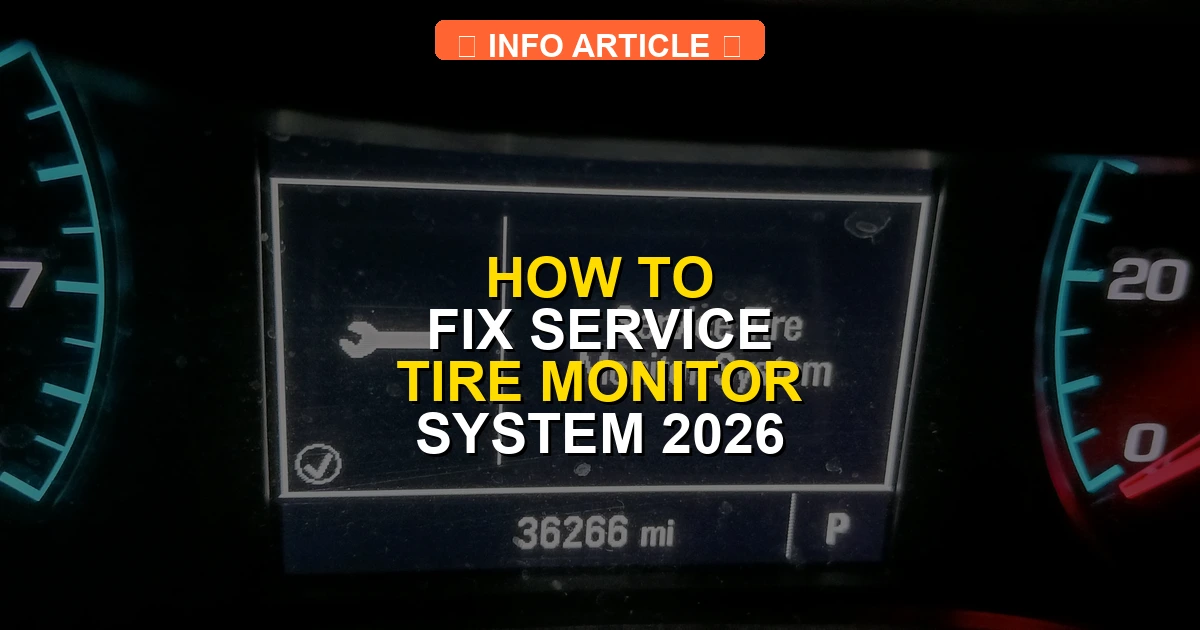
The ‘Service Tire Monitor System’ warning usually points to a dead TPMS sensor battery, incorrect tire pressure, or a failing receiver module. Fixing this issue involves checking air pressures, performing a manual sensor relearn procedure, or replacing faulty hardware.
Fixing the “Service Tire Monitor System” warning on your dashboard usually comes down to resetting a confused sensor, adjusting your tire pressure, or replacing a dead TPMS battery. Unlike a standard low-pressure light, this specific text message means your car’s computer has lost communication with one or more tire sensors, or the system itself has encountered an internal fault.
By 2026, most vehicles rely on direct TPMS setups with battery-powered sensors inside every wheel. When these components fail or lose their programming, your dashboard lights up. You can quickly resolve this issue by following a systematic approach to diagnose the root cause and execute the proper reset procedure.
Key Takeaways
- Check and adjust all tire pressures to the manufacturer’s recommended psi.
- Inspect each TPMS sensor for physical damage or corrosion.
- Perform a sensor relearn procedure using the vehicle dashboard or an OBD-II tool.
- Replace dead TPMS sensor batteries, which typically last between 5 to 8 years.
- Visit a professional tire shop if the warning persists after resetting.
What Causes the Service Tire Monitor System Warning
Dead or Weak Sensor Batteries
Every TPMS sensor contains a tiny lithium battery designed to last between five and ten years. If your vehicle is approaching that age, a depleted battery is the most common culprit behind the service warning. The sensor simply stops broadcasting its data to your car’s receiver module.
- Standard sensor batteries cannot be replaced individually; the entire valve stem sensor unit must be swapped out.
- Cold weather in early 2026 can temporarily drain weak batteries, causing intermittent warning messages that disappear once the vehicle warms up.
- A specialized digital TPMS scan tool can quickly ping each wheel to verify if the sensor is transmitting its ID and battery health.
Signal Interference and Lost Programming
Sometimes your tire sensors are fully functional, but your vehicle’s computer has forgotten their specific digital IDs. This frequently happens after tire rotations, wheel replacements, or severe electrical interference from aftermarket dash cams and phone chargers plugged into the cabin.
- Tire rotations require a formal sensor relearn procedure so the car knows which corner of the vehicle each pressure reading belongs to.
- Aftermarket electronic accessories plugged into 12V outlets can block radio frequency signals between the wheel sensors and the onboard receiver.
- Body Control Module (BCM) software glitches can occasionally wipe out stored sensor memory, requiring a dealership or advanced OBD2 scan tool reset.
Service Tire Monitor System: What Causes It and How to Fix It
Dealing with a persistent dashboard warning can be frustrating, especially when it concerns your vehicle’s safety features. This comprehensive walkthrough is designed to help you systematically diagnose and resolve the “Service Tire Monitor System” alert, saving you an expensive trip to the dealership.
Step 1: Check and Adjust Tire Pressures
What you need: A reliable digital tire pressure gauge, an air compressor (or access to a gas station air pump), and the vehicle placard located inside the driver-side door jamb.
Instructions: Begin by checking the recommended PSI for your specific vehicle by opening the driver door and locating the white and yellow safety certification sticker. Unscrew the valve stem caps on all four tires and one spare if applicable. Firmly press your digital pressure gauge onto the valve stem to take a reading. Inflate or deflate each tire until it matches the exact cold-inflation pressure specified on the placard, typically between 32 and 35 PSI for standard passenger vehicles.
Pro Tip: Always check your tire pressures when the tires are “cold”—meaning the car has been driven less than a mile or sat parked for at least three hours—to ensure accurate readings.
Step 2: Perform a TPMS Manual Relearn Procedure
What you need: Your vehicle key fob, potentially a TPMS relearn tool (magnet or electronic activation tool depending on your vehicle make), and a notepad.
Instructions: Turn your ignition switch to the “ON” position without starting the engine. Use your steering wheel controls to navigate the driver information center until you reach the “Tire Pressure” screen, then hold the set/select button until the horn chirps or the dashboard displays “Tire Learning Active.” Starting at the front-left (driver side) wheel, hold your relearn tool against the valve stem or let air out/in if using the manual method until the horn chirps. Proceed clockwise to the front-right, rear-right, and finally rear-left tires, repeating the process for each.
Pro Tip: If your vehicle requires the deflation method, release air for about 5 to 10 seconds until the horn sounds, but remember to immediately reinflate that tire back to the proper PSI afterward.
Step 3: Inspect Valve Stems and TPMS Sensors
What you need: A spray bottle filled with soapy water (dish soap and water mixture) and a clean shop towel.
Instructions: Visually and physically inspect all four tire valve stems. Spray a generous amount of your soapy water mixture around the base of each valve stem and the core area. Watch closely for the formation of expanding bubbles, which indicates a slow air leak causing low pressure and triggering the monitor system. Additionally, check for missing valve stem caps, which can allow moisture and road salt to corrode the internal sensor mechanism over time.
Pro Tip: Metal valve stems are particularly prone to galvanic corrosion when exposed to winter road salt, which can cause the sensor to snap off inside the tire. Replace corroded caps immediately.
Step 4: Scan for Diagnostic Trouble Codes (DTCs)
What you need: An OBD-II scanner capable of reading enhanced body and TPMS module codes.
Instructions: Locate the OBD-II diagnostic port underneath your vehicle dashboard on the driver side, typically near the steering column. Plug your advanced diagnostic scanner into the port and turn your ignition to the “ON” position. Navigate the scanner menu to select your vehicle make and model, then run a comprehensive system scan specifically targeting the TPMS or Body Control Module (BCM). Make a note of any specific trouble codes, such as code C0775 or similar sensor communication faults.
Pro Tip: Basic generic OBD-II scanners only read engine codes (P-codes). Ensure your scanner explicitly supports reading TPMS and chassis codes to successfully diagnose this system.
Step 5: Replace a Dead TPMS Sensor Battery
What you need: A tire machine (or local tire shop assistance), a new replacement TPMS sensor matching your OEM frequency (usually 315 MHz or 433 MHz), and a torque wrench.
Instructions: TPMS sensors are powered by internal lithium-ion batteries that typically last between 5 to 8 years. If your scanner points to a dead sensor, the tire must be safely demounted from the wheel rim using a tire changing machine. Carefully unscrew or unclip the old sensor from the back of the valve stem. Install the new OE-style sensor, ensuring the rubber seal is seated correctly, and tighten the retaining nut to the manufacturer’s specified torque, usually around 40 inch-pounds. Remount and balance the tire.
Pro Tip: Always replace the entire sensor unit rather than trying to change the battery, as these sensors are hermetically sealed units designed to be disposable once depleted.
Step 6: Reset the TPMS Control Module
What you need: A wrench or socket set for battery disconnection, and electrical contact cleaner.
Instructions: Sometimes the TPMS computer module simply experiences a software glitch and needs a hard reset. Turn off your vehicle completely. Open the hood and use your wrench to disconnect the negative (-) battery terminal. Leave the battery cable disconnected for approximately 10 to 15 minutes to allow all electrical capacitors to fully drain. While waiting, locate any dedicated TPMS fuses in your interior and under-hood fuse boxes, pull them to inspect for blown elements, and clean them with contact cleaner before reinstalling. Reconnect the negative battery terminal securely.
Pro Tip: Disconnecting your vehicle battery will reset your radio presets, clock, and engine idle-learn parameters, which may require a short drive to recalibrate.
✅ Final Checklist
- All tires inflated to the exact PSI specified on the door placard
- TPMS manual relearn procedure successfully completed with horn confirmation
- No air leaks detected around valve stems using the soapy water test
- Diagnostic trouble codes cleared from the TPMS control module
- Dashboard warning light turned off after a 15-minute test drive
Important Notes:
- Always engage your parking brake and use wheel chocks when working around tires and lifting the vehicle with a jack.
- Seek professional assistance from a certified tire technician if you encounter stripped valve stems, severely corroded TPMS bands, or if sensors repeatedly fail to program.
- Estimated time for diagnosis and repair is 30 to 90 minutes. Cost ranges from $0 (if just needing air or a reset) to $150–$300 if a tire sensor must be professionally replaced and programmed.
How to Troubleshoot TPMS Sensors and Tire Pressure
Verifying Physical Tire Pressures
Never assume your tire pressure is correct just because the warning light is on. Grab a reliable manual pressure gauge and check all four tires, including your full-size spare if your vehicle monitors it. Temperature drops cause tire pressure to fluctuate wildly, dropping roughly one PSI for every ten-degree Fahrenheit shift.

- Locate the correct cold inflation pressure on the placard sticker located inside your driver-side door jamb.
- Inflate or deflate every tire to the exact manufacturer specification before attempting any electronic reset procedures.
- Look for hidden slow leaks, nail punctures, or damaged valve stems that could be keeping pressure just below the alert threshold.
Using a TPMS Scan Tool for Diagnostics
If your tire pressures match the door placard and the warning persists, you need to identify which specific sensor is failing. A dedicated TPMS activation tool allows you to read individual sensor data without pulling apart your wheels. Hold the tool near each valve stem and trigger a read.
- If the tool fails to get a response from a specific wheel, that sensor is dead and must be replaced immediately.
- Advanced tools display sensor temperatures, battery status, and unique ID codes required for reprogramming.
- Once you identify the faulty hardware, you can tackle the physical replacement or move straight to a system relearn.
Step-by-Step Guide to Resetting the Tire Monitor System
When basic inflation and driving do not clear the dashboard warning, a manual reset is required. Modern vehicles in 2026 feature distinct reset procedures depending on the make and model year. Following the correct sequence ensures the computer successfully re-learns sensor positions.
Using the Internal Dashboard Menu
Many contemporary vehicles allow drivers to clear the service tire monitor system directly through the instrument cluster. Use these numbered steps to execute an onboard reset:
- Turn the ignition switch to the “On” position without starting the engine.
- Use the steering wheel control buttons to navigate to the “Vehicle Information” or “Settings” menu on the display screen.
- Scroll until you locate the “Tire Pressure” or “TPMS” screen.
- Press and hold the “Select” or “Reset” button until the message center displays a prompt confirming the re-learn mode has started.
- Drive the vehicle at speeds above 25 mph for approximately 10 to 20 minutes to allow the sensors to transmit their fresh signals to the body control module.
Using a Dedicated TPMS Re-Learn Tool
If the onboard menu method fails, vehicles often require a dedicated radio frequency activation tool. Automotive technicians and DIYers rely on these handheld devices to wake up sleeping sensors:
- Place the vehicle ignition into the accessory or service mode.
- Initiate the TPMS re-learn function through the dashboard menu or by rapidly cycling the key fob and brake pedal according to your owner manual specifications.
- Start at the front-driver tire, place the tip of the TPMS tool against the sidewall near the valve stem, and trigger the device.
- Wait for the vehicle’s horn to chirp, confirming that the sensor ID has been successfully registered by the computer.
- Repeat the activation process clockwise around the vehicle at the passenger-front, passenger-rear, and driver-rear tires respectively.
What If It Still Doesn’t Work and When to See a Mechanic
If resetting the system and correcting tire pressures fails to clear the dashboard warning, a hardware component has likely failed. According to automotive service data, persistent TPMS errors usually stem from depleted batteries inside the sensors, physical damage from tire changes, or a failing receiver module. Try these final troubleshooting steps before visiting a professional:
- Disconnect the vehicle’s negative battery terminal for 15 minutes to perform a hard reset on the body control module and clear stubborn error codes.
- Inspect the spare tire pressure, as many modern trucks and SUVs house a fully functioning TPMS sensor inside the spare tire assembly.
- Scan the vehicle’s computer using an OBD-II scanner capable of reading chassis and body codes to identify the specific faulty sensor ID.
When these fallback steps fail, professional intervention is necessary. Certified technicians utilize advanced diagnostic scanners to pinpoint dead sensors in minutes. According to industry pricing for 2026, replacing a single TPMS sensor typically costs between $100 and $250 including parts and labor. If multiple sensors require replacement due to age—as factory batteries typically degrade after 5 to 10 years—shops often recommend replacing all four simultaneously.
Conclusion
The “Service Tire Monitor System” warning is an important safety alert that should not be ignored. Fixing the issue typically involves correcting tire pressure, performing an onboard dashboard reset, or replacing a depleted sensor battery. According to verified research and expert sources from the National Highway Traffic Safety Administration, maintaining a functional TPMS prevents premature tread wear and optimizes fuel economy. Take action today by checking your tire pressures and initiating a system reset to restore complete peace of mind on the road.
❓ Frequently Asked Questions
How much does it cost to replace a faulty TPMS sensor?
Replacing a single TPMS sensor typically costs between $50 and $150, including parts and labor at a tire shop or dealership.
Will adding air to my tires turn off the service message?
Adding air turns off a low-pressure light, but a ‘Service Tire Monitor System’ message usually requires a system reset or sensor replacement.
Can a bad receiver module cause this error?
Yes, if multiple sensors fail to communicate simultaneously, the vehicle’s internal TPMS receiver or antenna may be at fault.
How long do TPMS sensors last?
Original equipment TPMS sensors generally last between 5 and 10 years before their internal lithium batteries run out of power.
Do aftermarket sensors require programming?
Most aftermarket TPMS sensors must be programmed with the vehicle’s specific frequency and protocol before they can be learned by the car.
Can extreme weather trigger the tire monitor warning?
Extreme cold drops tire pressure significantly, which can trigger low-pressure alerts, though severe drops may cause the full service warning.